
Plugin · WordPress.org
Wolvy Video for WordPress
The official plugin puts Wolvy video on a WordPress site with every piece of code from these docs already written: signed viewer tokens, correct iframes, a library browser, analytics, health checks and a verified webhook receiver.
On this page
What it does#
Block, shortcode, Elementor, PHP
Insert a video however you build pages. Every player gets the iframe attributes DRM needs.
Signed playback
Tokens are signed on your server with your signing secret — no API call per page view.
Library & analytics
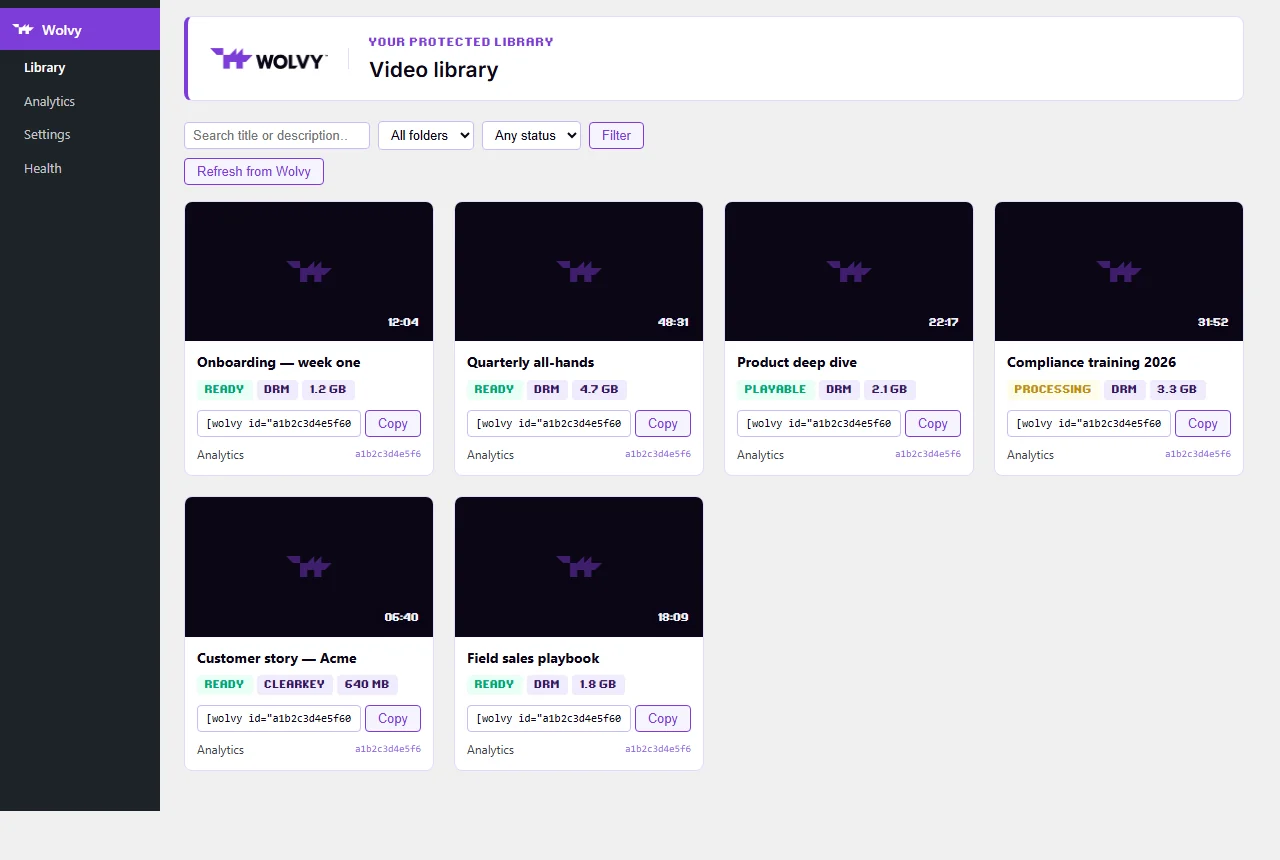
Search your Wolvy library, copy shortcodes, see views, watch time, countries and recent viewers mapped to WordPress users.
Health screen
Names the silent breakers — domain rules, referrer policy, a rotated secret, page caching — before your visitors find them.
Install & connect#
- InstallIn wp-admin go to Plugins → Add New, search for Wolvy Video, then Install and Activate. Or download it from WordPress.org.
- Add your API keyCreate one in the Wolvy dashboard (Settings → API) with the scopes below. In Wolvy → Settings, paste it and press Verify API key — this also discovers your account id.
- Add your signing secretCopy it from Settings → Watermark → Signing secret, paste it and press Verify signing secret.
- Check HealthOpen Wolvy → Health and fix anything that is not a pass before you publish a page with a video.
API key scopes#
The key powers the admin features only — playback never uses it. A missing scope hides the feature that needs it rather than breaking the site.
| Scope | Used for |
|---|---|
account:read | Account details, player settings, the domain-rules check. |
videos:read | Library browser, block picker, posters and titles. |
analytics:read | Analytics screen. |
sessions:read | Recent viewers, resolved back to WordPress users. |
usage:read | Plan usage meters. |
webhooks:manage | Registering this site’s webhook endpoint. |
playback:sign | Verifying the stored signing secret. |
Secrets in wp-config.php#
Settings saved in wp-admin are encrypted with keys derived from your site’s salts, which protects them if only the database leaks. To keep them out of the database entirely, define constants — a constant always wins over the saved setting.
// wp-config.php — above the line "That's all, stop editing!"
define( 'WOLVY_API_KEY', 'wv_live_…' );
define( 'WOLVY_VIEWER_SIGN_SECRET', '…64 hex characters…' );| Constant | Value |
|---|---|
WOLVY_API_KEY | Developer API key, wv_live_…. |
WOLVY_VIEWER_SIGN_SECRET | Your account’s viewer signing secret (64 hex characters). |
WOLVY_ACCOUNT_ID | Numeric account id used in embed URLs. Normally filled in for you when you press Verify API key. |
WOLVY_WEBHOOK_SECRET | The whsec_… secret for inbound webhook deliveries. |
WOLVY_API_BASE / WOLVY_EMBED_BASE | Endpoint overrides. Leave unset. |
Embedding videos#
Block editor
Add the Wolvy Video block and pick a video from your library — searchable, filterable by folder. The block renders on the server, so each visitor gets their own token.
Shortcode
[wolvy id="a1b2c3d4e5f60718293a"]

[wolvy id="a1b2c3d4e5f60718293a" aspect="9:16" max_width="420px"]

[wolvy id="a1b2c3d4e5f60718293a" facade="1" title="Lesson 3 — Pricing strategy"]| Attribute | Default | Description |
|---|---|---|
id | — | The video id. Required. [wolvy a1b2c3d4e5f60718293a] works as a shorthand. |
aspect | 16:9 | Ratio as w:h, w/h or a number. Clamped between very wide and very tall so a typo cannot collapse the player. |
facade | 0 | 1 shows the poster with a play button and loads the player only on click — keeps pages with many videos light. |
lazy | setting | 1/0 — add loading="lazy" to the iframe. Ignored when facade="1". |
poster | from Wolvy | A poster URL for click-to-play mode, or none. |
title | video title | Accessible name of the iframe. Fetched from your library when omitted. |
max_width | setting | A CSS length such as 720px, 80% or 40rem. |
class | — | An extra CSS class on the wrapper. |
ttl | setting | Token lifetime in seconds for this embed only (60–86400). |
[wolvy_video] works as an alias. An attribute the plugin cannot honour — autoplay is the usual one — shows a notice to administrators instead of being silently ignored: playback behaviour is an account setting in the Wolvy dashboard.
Elementor
Drag in the Wolvy Video widget (it appears only when Elementor is active) and choose a video in the panel.
Theme templates
<?php
// In a theme template. Returns nothing when the plugin is inactive.
if ( function_exists( 'wolvy_video' ) ) {
    wolvy_video( 'a1b2c3d4e5f60718293a', array( 'aspect' => '16:9', 'facade' => 1 ) );
}| Function | Returns |
|---|---|
wolvy_video( $id, $args = array(), $echo = true ) | Render a player from a theme template. $args takes the shortcode attributes. |
wolvy_video_embed_url( $id ) | The embed URL, signed for the current visitor (unsigned for guests). |
wolvy_viewer_token() | The current visitor’s signed token. One token covers every video, so call it once per page. |
wolvy_viewer_id() | The viewer id the watermark will show for the current visitor. |
wolvy_get_video( $id ) | One video’s metadata from your library (cached). Returns an array or WP_Error. |
wolvy_get_videos( $args = array() ) | A page of the library (cached). Pass next_cursor as starting_after for the next page. |
Who can watch#
Everyone, by default. A signed-in visitor gets a signed token, so the watermark and session records name them. A visitor who is not signed in gets an unsigned embed, which plays unless your account has enforcement on.
- To restrict playback, turn on Require visitors to sign in in Wolvy → Settings and choose what others see: a message, a sign-in link, or nothing.
- For finer rules — a membership level, a purchased course — use the
wolvy_can_viewfilter.
What the watermark shows
| Identity mode | Example | Notes |
|---|---|---|
| Pseudonymous (default) | wv_9f2b6c1d3e4a5b60 | Stable per user, stored in user meta so a leak traces back to an account. Reveals nothing on screen. |
| WordPress user id | wp-user-42 | Traceable, and meaningless to anyone who sees it. |
| Username | sara.k | Legible on the watermark. |
| Email address | [email protected] | The strongest deterrent — and visible to anyone looking at the screen. |
The id is stored in user meta and registered with WordPress’s personal-data export and erase tools. Pages that carry a viewer token are marked uncacheable (DONOTCACHEPAGE and Cache-Control: private, no-store); pages for anonymous visitors cache normally.
Filters & actions#
Hook into the plugin from your theme’s functions.php or a small site plugin.
wolvy_can_view filter
The access gate. Return false to show the “please sign in” notice instead of the player. This is where a membership or LMS plugin hooks in.
<?php
// Only members may watch. Replace the role check with your membership plugin's own test.
add_filter( 'wolvy_can_view', function ( $can_view, $video_id ) {
    if ( ! is_user_logged_in() ) {
        return false;
    }
    $roles = (array) wp_get_current_user()->roles;
    return (bool) array_intersect( array( 'administrator', 'member' ), $roles );
}, 10, 2 );
wolvy_viewer_id filter
Use a different identity on the watermark — an LMS enrolment, a CRM contact, a licence number. Keep it stable per person; anything past 64 characters is cut.
<?php
// Put the student number on the watermark instead of the default pseudonymous id.
add_filter( 'wolvy_viewer_id', function ( $id, $user_id ) {
    $student_no = get_user_meta( $user_id, 'student_number', true );
    return $student_no ? 'STU-' . $student_no : $id;
}, 10, 2 );
wolvy_embed_url filter
Adjust the final embed URL.
wolvy_iframe_attributes filter
Final say over the iframe’s attributes. Keep allow (with encrypted-media) and referrerpolicy — both are load-bearing.
<?php
// Add a data attribute for your own analytics. Leave allow and referrerpolicy untouched.
add_filter( 'wolvy_iframe_attributes', function ( $attributes, $video_id, $atts ) {
    $attributes['data-lesson'] = $video_id;
    return $attributes;
}, 10, 3 );
wolvy_player_html filter
Final say over the whole player markup.
wolvy_guest_notice_html filter
Replace the block shown to visitors who may not watch.
wolvy_admin_capability filter
Who may open each Wolvy admin screen.
wolvy_webhook_event action
Fires for every verified webhook delivery. Do slow work (emails, LMS updates) here, not in a filter.
<?php
// Email the site admin when a video finishes encoding. Runs only for verified deliveries.
add_action( 'wolvy_webhook_event', function ( $type, $data, $event ) {
    if ( 'video.ready' !== $type ) {
        return;
    }
    wp_mail(
        get_option( 'admin_email' ),
        'A Wolvy video is ready',
        sprintf( 'Video %s finished encoding and can be published.', $data['id'] )
    );
}, 10, 3 );Webhooks#
Optional. Encoding is asynchronous, so a video added to a page right after upload is cached as “processing”. With webhooks on, Wolvy tells the site the moment it is ready and the cached copy is refreshed.
- EnableIn Wolvy → Settings, register the webhook. The site must be reachable on a public https address —
localhostand.testdomains cannot receive deliveries. - DoneThe plugin creates the endpoint
https://your-site.com/wp-json/wolvy/v1/webhookforvideo.ready,video.failed,video.deletedandcaption.ready, stores its secret, and verifies every delivery’s signature and timestamp.
Build on it with the wolvy_webhook_event action. If you deactivate the plugin for good, remove the endpoint in Wolvy → Settings first, so Wolvy stops sending to a URL that no longer answers.
Health & troubleshooting#
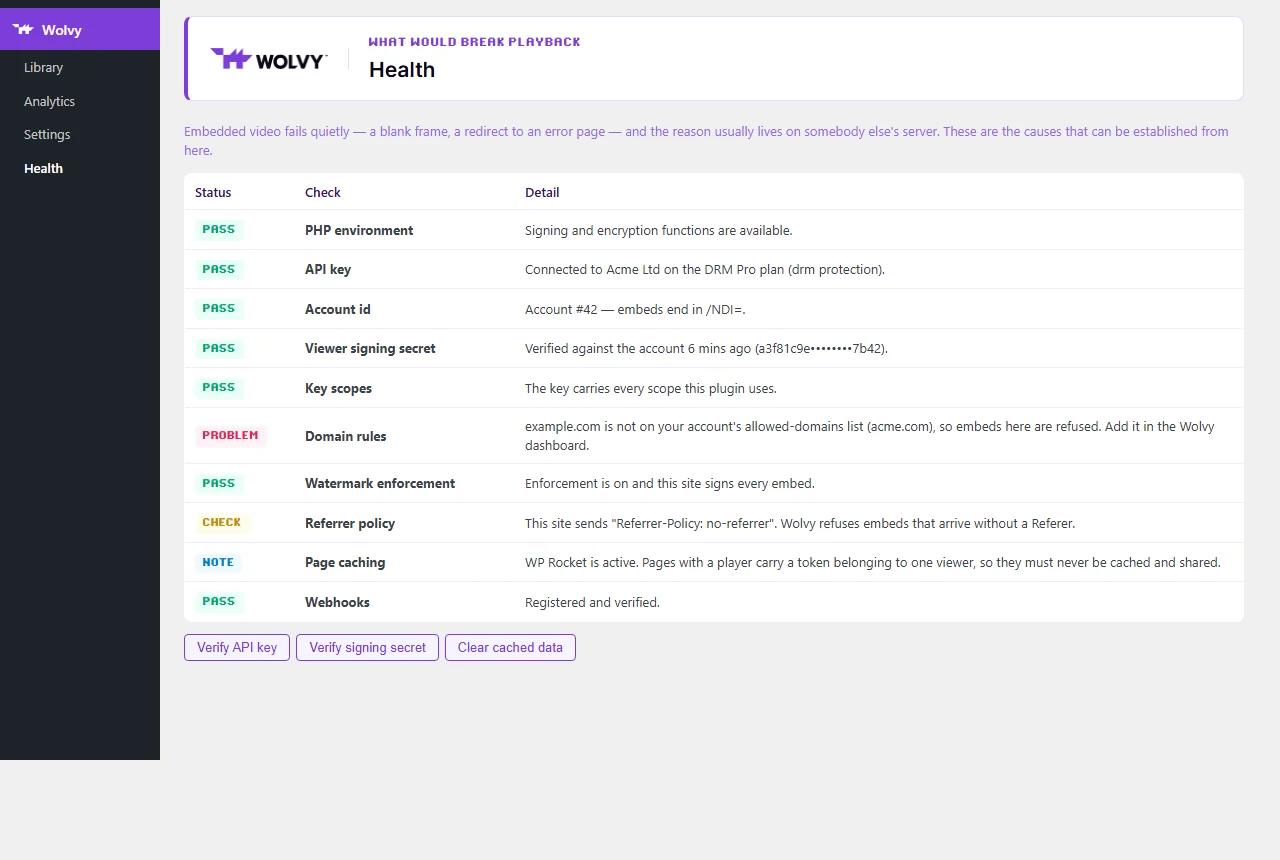
| Symptom | Cause | Fix |
|---|---|---|
| Blank player or error page | This site is not on your account’s allowed domains | Add the hostname in Settings → Protection → Allowed domains |
| Blank player after installing a security plugin | The site sends Referrer-Policy: no-referrer | The plugin’s iframe overrides it — check a custom wolvy_iframe_attributes filter didn’t remove referrerpolicy |
| Watermark shows no viewer id — or, with enforcement on, nothing plays | The signing secret was rotated in the dashboard, so the site’s tokens no longer verify | Paste the new secret and press Verify signing secret |
| One visitor sees another visitor’s id | A page cache serving logged-in pages | Exclude pages with videos, or stop caching for logged-in users |
| Library or analytics screens empty | The API key lacks a scope | Health lists the missing scopes; create a key with them |
Something wrong or unclear on this page? Email [email protected] — include the page name.